-
ວິທີແກ້ໄຂ
ສ່ວນຂະຫຍາຍສຳລັບ Chrome - ສົນທະນາກັບ PDF
- AI PDF Summarizer
- AI Detection Remover
AI Content Detector - AI Generator Paragraph
- AI Humanizer
- AI Rewrite
- AI Scrambler
- AI Sentence Generator
- AI to Human Text
- AI Writer Detector
- ເຄື່ອງຂຽນບົດຄືນບົດຄວາມ
- ປ່ຽນຂໍ້ຄວາມໃນປະໂຫຍກ
- ປ່ຽນຄຳສັບໃນບົດຄັດຫຍໍ້
- ChatGPT Rewriter
- ChatGPT Reworder
- ປ່ຽນຄຳສັບໃນບົດຄັດຫຍໍ້
- ຂະຫຍາຍບົດຄັດຫຍໍ້ AI
- ຂະຫຍາຍບົດຄວາມຂອງຂ້ອຍ
- ຂະຫຍາຍການຂຽນຂອງຂ້ອຍ
- GPT Rewriter
- GPT Zero Rewriter
- Humanize Text
- ຂະຫຍາຍບົດຄວາມ
- ຂຽນບົດຄືນໃໝ່
- ປ່ຽນບົດຄວາມ
- Paraphrase AI
- Paraphrase IO
- ປ່ຽນຄຳເປັນພາສາສະເປນ
- Paraquill
- ເຄື່ອງມືປ່ຽນຄຳ
- Paraquill
- Quill It
- Rephrase AI
- Rephraser
-
ກໍລະນີ
- ເຄື່ອງສ້າງຄຳຄິດເຫັນ
- Reworder
- Rewordify
- ເຄື່ອງມື Rewordify
- ການປ່ຽນຄຳ
- ເຄື່ອງມືສ້າງການປ່ຽນຄຳ
- Rewrite AI
- ຂຽນ chat gpt ຄືນໃໝ່
- ຂຽນບົດຄັດຫຍໍ້ຄືນໃໝ່
- ຂຽນບົດຄືນບົດຄວາມຂອງຂ້ອຍ
- ຂຽນປະໂຫຍກຄືນໃໝ່
- ແກ້ໄຂ
- ເຄື່ອງມື Rewriter
- ປ່ຽນປະໂຫຍກ
- ຂະຫຍາຍປະໂຫຍກ
- ເຄື່ອງສ້າງປະໂຫຍກ
- ປ່ຽນປະໂຫຍກຄືນໃໝ່
- ຂຽນປະໂຫຍກຄືນໃໝ່
- Spin Rewriter
- Stealth GPT
- Stealthwriter AI
- ປັບປຸງຂໍ້ຄວາມ
- ແກ້ໄຂຂໍ້ຄວາມ
- ເຮັດໃຫ້ຂໍ້ຄວາມເປັນມະນຸດ
- ເຄື່ອງຂຽນຄືນຂໍ້ຄວາມ
- ຄຳສັບຄ້າຍຄືກັນ
- ປ່ຽນຄຳສັບ
- ປ່ຽນຄຳສັບ
- ປ່ຽນຄຳສັບຄືນໃໝ່
- ເຄື່ອງຂຽນຄືນຄຳສັບ
- ກ່ຽວກັບພວກເຮົາ
- ລາຄາ
- ການທົບທວນ
ສົນທະນາກັບ PDF: ຖາມຄໍາຖາມແລະໄດ້ຮັບຄໍາຕອບຈາກເອກະສານໃດໆ
*ບໍ່ເສຍຄ່າໃຊ້ບໍລິການໃນການເລີ່ມຕົ້ນ. ບໍ່ຈໍາເປັນຕ້ອງມີບັດເຄຣດິດ.
AI ຊ່ວຍໃຫ້ທ່ານສົນທະນາກັບໄຟລ໌ PDF ຂອງທ່ານແນວໃດ
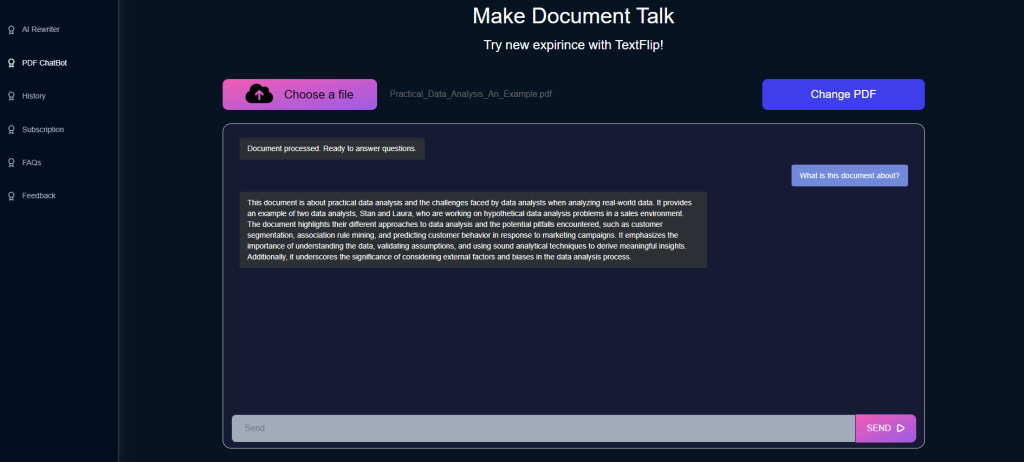
A long PDF is easy to store and hard to read in a hurry. AI changes that by letting you ask PDF files direct questions instead of scrolling through them. TextFlip.ai offers this as a simple service: upload a PDF, type a question, and get an answer drawn from the document itself. The AI interprets the file's content and answers based on what the text says, so the reply is specific to your document rather than a generic summary. This is most useful for students, researchers, and professionals, the people who regularly face long reports and dense reference material. Instead of skimming for one figure or definition, you ask for it and move on. That saves time, and it also makes the material easier to understand and remember, since you can question anything that is unclear.
ວິທີການ
ສົນທະນາກັບ PDF
ຖາມ AI ຂອງພວກເຮົາກ່ຽວກັບໄຟລ໌ທີ່ທ່ານບໍ່ມີເວລາທີ່ຈະອ່ານ:
ເອກະສານ PDF, ບົດຄວາມ, ລາຍລະອຽດຜະລິດຕະພັນແລະອື່ນໆ.
AI ສະຫຼຸບເນື້ອຫາຂອງທ່ານໃນສອງສາມວິນາທີ, ແລະທ່ານສາມາດສົ່ງອອກຜົນໄດ້ຮັບທຸກບ່ອນທີ່ທ່ານຕ້ອງການ.

ChatPDF ໃຊ້ເພື່ອຫຍັງ?
ChatPDF is the tool from TextFlip that lets you hold a real conversation with a PDF file. You upload a document, ask questions in plain language, and get answers based on what the file says. People use it to pull key facts out of dense reports and to clarify concepts in textbooks without rereading whole chapters. Professionals and students get the most out of it, since both groups spend hours inside long documents; asking a question takes seconds where a manual search takes minutes or more. It also helps readers with visual impairments or reading difficulties, who can get at a document's content through questions and answers instead of working through the full text. In short, ChatPDF turns reading a PDF from a one-way activity into a back-and-forth exchange with the document.
ຄວາມຮູ້ພື້ນຖານ
ຄຳຖາມທີ່ຖາມເລື້ອຍໆ
ແມ່ນຫຍັງ TextFlip?
TextFlip.ai is an online paraphrasing tool. Paste in a large block of text and it rewrites the whole thing while keeping the original meaning, which is useful for content creators, students and professionals who need a fresh version of something they already have. Rewritten text also tends to pass AI detector checks, so your content reads as your own. You stay in control of the output: swap specific keywords for your own and add instructions about the style you want. The point of your text stays put; the wording around it changes.
ຂໍ້ມູນຂອງຂ້ອຍຄວນມີລັກສະນະແນວໃດ?
ດຽວນີ້ເຈົ້າເອົາຂໍ້ຄວາມໃສ່ແບບຟອມເວັບ. ສະຫນັບສະຫນູນ .DOCX ແລະ .ໄຟລ໌ PDF ແລະ URL ຈະມາໃນໄວໆນີ້.
ຂ້ອຍສາມາດໃຫ້ຄໍາແນະນໍາຂອງຕົນເອງໄດ້ບໍ?
ແມ່ນແລ້ວ. ມີຊ່ອງຂໍ້ມູນເຕືອນທາງເລືອກທີ່ທ່ານສາມາດບອກ AI ວິທີທີ່ທ່ານຕ້ອງການໃຫ້ຜົນຜະລິດອ່ານ.
ຂ້ອຍສາມາດແທນທີ່ຄຳສັບບາງຄຳໄດ້ບໍ?
ແມ່ນແລ້ວ. ທ່ານສາມາດແລກປ່ຽນຄໍາສັບສະເພາະຫຼືຊື່ຍີ່ຫໍ້ໃນຂໍ້ຄວາມຕົ້ນສະບັບສໍາລັບຄໍາທີ່ທ່ານຕ້ອງການ.
ຂໍ້ມູນຂອງຂ້ອຍຖືກເກັບໄວ້ຢູ່ໃສ?
ຂໍ້ມູນຂອງທ່ານຖືກເກັບໄວ້ໃນເຊີບເວີທີ່ປອດໄພໃນ Virginia, ສະຫະລັດ.
ມັນຮອງຮັບພາສາອື່ນບໍ?
ພາສາອັງກິດເຮັດວຽກດີທີ່ສຸດ. ພາສາອື່ນໆທັງຫມົດຍັງຢູ່ໃນເບຕ້າ.
ຂ້ອຍຈະລຶບບัญຊີຂອງຂ້ອຍໄດ້ແນວໃດ?
ເຈົ້າສາມາດລຶບບັນຊີຂອງເຈົ້າໄດ້ທີ່ນີ້: https://dashboard.textflip.ai/account/delete
ມີ AI ສົນທະນາທີ່ອ່ານ PDF ໄດ້ບໍ?
Yes. TextFlip built ChatPDF for exactly this: a chat AI that reads PDF files and answers questions about them. Open a document, ask what you want to know, and the AI replies with answers taken from the file's own content, in context. It is aimed at people who deal with dense, information-heavy PDFs, mainly professionals and students. A contract clause or a definition buried deep in the file: ask for it and the answer comes back in seconds, which beats scrolling through the file by hand. It clarifies complicated passages too, since you can keep asking follow-up questions until a concept makes sense. ChatPDF by TextFlip is less a reader than a way of putting a document on the other end of a conversation, where finding information is quicker and less tedious.