PDF સાથે ચેટ કરો: પ્રશ્નો પૂછો અને કોઈપણ દસ્તાવેજમાંથી જવાબો મેળવો
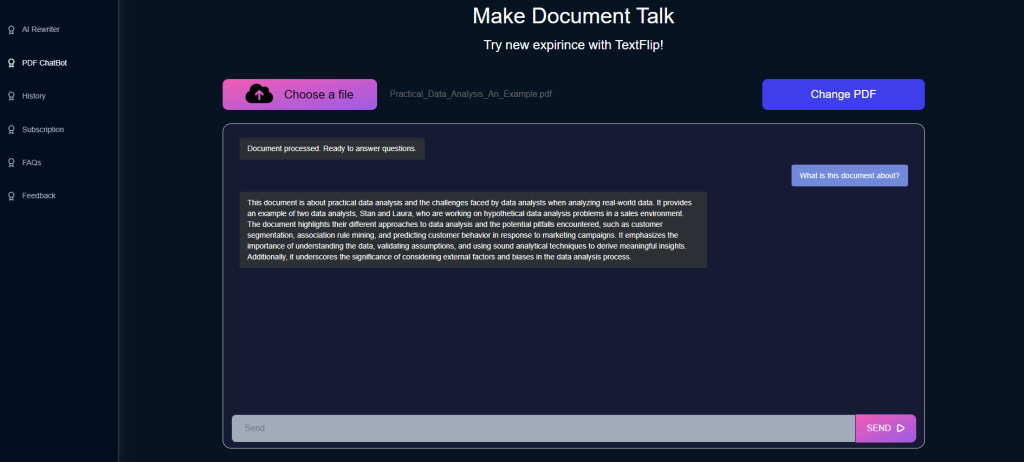

કેવી રીતે AI તમને તમારી PDF ફાઇલો સાથે ચેટ કરવા દે છે
લાંબી PDF સંગ્રહિત કરવી સરળ છે અને ઉતાવળમાં વાંચવી મુશ્કેલ છે. AI તમને PDF ફાઇલોને સ્ક્રોલ કરવાને બદલે સીધા પ્રશ્નો પૂછવાની મંજૂરી આપીને તેમાં ફેરફાર કરે છે. TextFlip.ai આ એક સરળ સેવા તરીકે પ્રદાન કરે છે: PDF અપલોડ કરો, પ્રશ્ન લખો અને દસ્તાવેજમાંથી જ જવાબ મેળવો. AI ફાઇલની સામગ્રી અને જવાબોનું અર્થઘટન ટેક્સ્ટ શું કહે છે તેના આધારે કરે છે, તેથી જવાબ સામાન્ય સારાંશને બદલે તમારા દસ્તાવેજ માટે વિશિષ્ટ હોય છે. આ વિદ્યાર્થીઓ, સંશોધકો અને વ્યાવસાયિકો માટે સૌથી ઉપયોગી છે, જે લોકો નિયમિતપણે લાંબા અહેવાલો અને ગાઢ સંદર્ભ સામગ્રીનો સામનો કરે છે. એક આકૃતિ અથવા વ્યાખ્યા માટે સ્કિમ કરવાને બદલે, તમે તે માટે પૂછો અને આગળ વધો. તે સમય બચાવે છે, અને તે સામગ્રીને સમજવા અને યાદ રાખવામાં પણ સરળ બનાવે છે, કારણ કે તમે અસ્પષ્ટ કોઈપણ પ્રશ્ન પર પ્રશ્ન કરી શકો છો.
PDF સાથે ચેટ કરો
અમારી AI ને ફાઇલો વિશે પૂછો કે તમારી પાસે વાંચવાનો સમય નથી:
પીડીએફ દસ્તાવેજો, લેખો, ઉત્પાદન વર્ણનો અને વધુ.
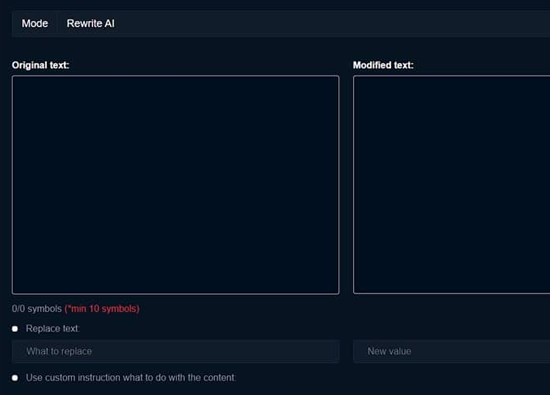
AI તમારી સામગ્રીનો થોડી સેકંડમાં સારાંશ આપે છે, અને જ્યાં પણ તમને જરૂર હોય ત્યાં તમે પરિણામ નિકાસ કરી શકો છો.

ChatPDF નો ઉપયોગ શેના માટે થાય છે?
ChatPDF એ TextFlip નું એક સાધન છે જે તમને PDF ફાઇલ સાથે વાસ્તવિક વાતચીત કરવા દે છે. તમે દસ્તાવેજ અપલોડ કરો છો, સાદી ભાષામાં પ્રશ્નો પૂછો છો અને ફાઇલ શું કહે છે તેના આધારે જવાબો મેળવો છો. લોકો તેનો ઉપયોગ ગાઢ અહેવાલોમાંથી મુખ્ય તથ્યો કાઢવા અને પાઠ્યપુસ્તકોમાં ખ્યાલોને સ્પષ્ટ કરવા માટે કરે છે, આખા પ્રકરણોને ફરીથી વાંચ્યા વિના. વ્યાવસાયિકો અને વિદ્યાર્થીઓ તેનો સૌથી વધુ લાભ મેળવે છે, કારણ કે બંને જૂથો લાંબા દસ્તાવેજોમાં કલાકો વિતાવે છે; પ્રશ્ન પૂછવામાં સેકન્ડ લાગે છે જ્યાં મેન્યુઅલ શોધમાં મિનિટો કે તેથી વધુ સમય લાગે છે. તે દૃષ્ટિની ક્ષતિ અથવા વાંચનમાં મુશ્કેલીઓ ધરાવતા વાચકોને પણ મદદ કરે છે, જેઓ સંપૂર્ણ ટેક્સ્ટ વાંચવાને બદલે પ્રશ્નો અને જવાબો દ્વારા દસ્તાવેજની સામગ્રી મેળવી શકે છે. ટૂંકમાં, ChatPDF એક-માર્ગી પ્રવૃત્તિમાંથી PDF વાંચનને દસ્તાવેજ સાથે આગળ-પાછળના વિનિમયમાં ફેરવે છે.

વારંવાર પૂછાતા પ્રશ્નો
શું કોઈ ચેટ AI છે જે PDF વાંચે છે?
હા. TextFlip એ બરાબર આ માટે ChatPDF બનાવ્યું: એક ચેટ AI જે PDF ફાઇલો વાંચે છે અને તેમના વિશેના પ્રશ્નોના જવાબ આપે છે. દસ્તાવેજ ખોલો, પૂછો કે તમે શું જાણવા માંગો છો, અને AI સંદર્ભમાં ફાઇલની પોતાની સામગ્રીમાંથી લીધેલા જવાબો સાથે જવાબ આપે છે. તે એવા લોકો માટે છે જેઓ ગાઢ, માહિતી-ભારે પીડીએફ, મુખ્યત્વે વ્યાવસાયિકો અને વિદ્યાર્થીઓ સાથે વ્યવહાર કરે છે. કરારની કલમ અથવા ફાઇલમાં ઊંડે દફનાવવામાં આવેલી વ્યાખ્યા: તે માટે પૂછો અને જવાબ સેકન્ડોમાં પાછો આવે છે, જે હાથથી ફાઇલ દ્વારા સ્ક્રોલ કરતા ધબકારા કરે છે. તે જટિલ ફકરાઓને પણ સ્પષ્ટ કરે છે, કારણ કે જ્યાં સુધી કોઈ ખ્યાલ અર્થપૂર્ણ ન થાય ત્યાં સુધી તમે ફોલો-અપ પ્રશ્નો પૂછતા રહી શકો છો. ChatPDF બાય TextFlip વાતચીતના બીજા છેડે દસ્તાવેજ મૂકવાની રીત કરતાં વાચક ઓછો છે, જ્યાં માહિતી શોધવી ઝડપી અને ઓછી કંટાળાજનક છે.